Step Into a Passwordless Future with PassKey

Tired of remembering passwords? Say goodbye to password headaches with SC-Riber's new PassKey system!
Introduction
In today's digital world, we're forced to remember dozens of passwords daily. Creating complex passwords, keeping them secure, and using different passwords for each service is one of the biggest challenges of modern digital life. This is exactly where PassKey technology comes in.
SC-Riber website is now equipped with PassKey support. In this article, we'll explain in detail how our system works and the benefits it provides.
What is PassKey?
PassKey is a modern authentication method based on FIDO2 and WebAuthn standards. This technology replaces traditional passwords by using cryptographic keys securely stored on your device.
How It Works
- Registration Phase: When creating your first PassKey, your device generates a pair of cryptographic keys - one private, one public.
- Public Key: Stored securely on our server.
- Private Key: Stays only on your device, never leaves.
- Login: You verify your identity with fingerprint, face recognition, or PIN.
- Cryptographic Signature: Your device creates a signature with the private key, and the server verifies it with the public key.
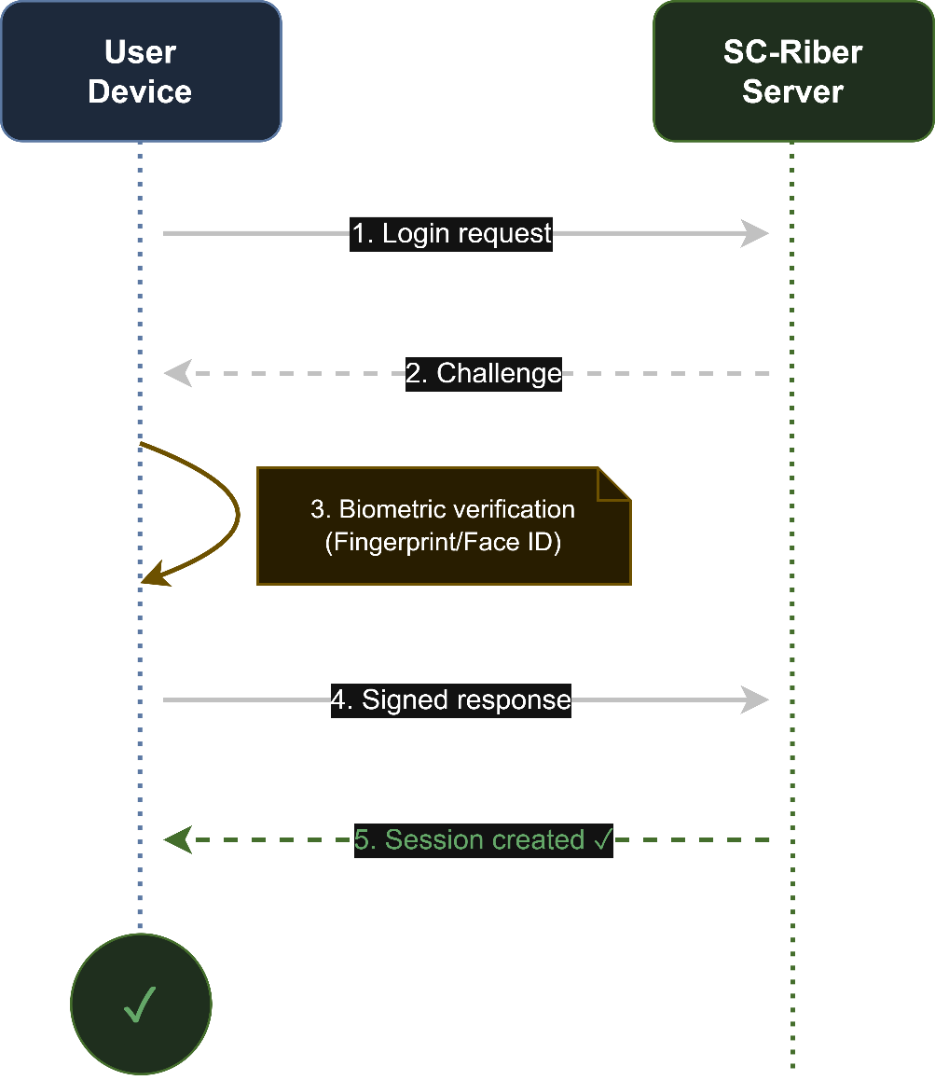
Using PassKey on SC-Riber
Creating a PassKey
- Log in to your SC-Riber account
- Go to Settings > Security
- Click "Add PassKey" button
- Use your device's biometric verification
- Your PassKey is ready!
Logging in with PassKey
- Click "Login with PassKey" option on the login page
- Your browser will show your registered PassKeys
- Scan your fingerprint or use face recognition
- Instant login - no password, no waiting!
Benefits of PassKey
🔒 Superior Security
- Phishing-proof: PassKeys are bound to domains, fake sites don't work
- No password leaks: No passwords stored on server means nothing to leak
- Brute force impossible: Cryptographic keys cannot be guessed
⚡ Speed and Convenience
- Login in seconds: Instant access with biometric verification
- No passwords to memorize: Say goodbye to complex passwords
- Synced across devices: Synchronization with iCloud Keychain, Google Password Manager
🌐 Platform Support
- Apple: iPhone, iPad, Mac (Safari, Chrome)
- Android: All modern devices (Chrome, Samsung Internet)
- Windows: Full support with Windows Hello
- Browsers: Chrome, Safari, Firefox, Edge
OAuth and PassKey: Best of Both Worlds
SC-Riber offers OAuth 2.0 support alongside PassKey:
| Method | Advantage | When to Use |
|--------|-----------|-------------|
| PassKey | Most secure, passwordless | As primary login method |
| Google OAuth | Fast, widespread | If you have a Google account |
| GitHub OAuth | For developers | For technical users |
| Discord OAuth | Community integration | For Discord users |
| X OAuth | Community integration | For X users |
Frequently Asked Questions
What if I lose my PassKey?
Don't worry! You can register multiple PassKeys or use OAuth methods as backup. We also have a recovery email option available.
Do all browsers support it?
Yes! Most modern browsers (Chrome 109+, Safari 16+, Firefox 122+, Edge 109+) support PassKey.
Will it work on my old device?
PassKey requires at least Windows 10, macOS Ventura, iOS 16, or Android 9. You can use OAuth methods on older devices.
Conclusion
PassKey technology is ushering in a new era of digital security. At SC-Riber, we're proud to offer our users the most up-to-date and secure authentication methods available.
Break free from password hassles and embrace the future of security today!